Timeline
The Timeline view displays records as events on a vertical or horizontal timeline, with a TODAY marker indicating the current date.
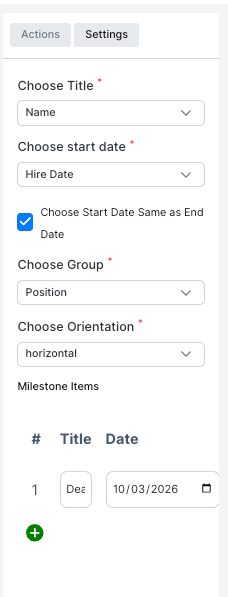
| Setting | Description |
|---|---|
| Choose Title | The field shown as the event label |
| Choose start date | The date field used to place the event on the timeline |
| Choose Start Date Same as End Date | If checked, the event spans one day only |
| Choose Group | The field used to group events into sections |
| Choose Orientation | Display the timeline horizontally or vertically |
| Milestone Items | Add specific milestone dates with a title and date |